Snap it, and it is logged
Photograph your plate and the AI recognises the foods, estimates the amount in grams and works out calories, protein, carbs, fat, fibre and calcium. Got a name wrong? Fix the name and one tap updates the values.
Most calorie apps give you a target on day one, and it stays there forever. Balanza recalculates it every week from what actually happens: what you ate versus your real weight trend. And logging a meal takes seconds: a photo, a sentence or a barcode.
You enter your height, weight and goal, and you get a number. But your body changes, and the calories you burn change with it. The target stays put, the weight stalls, and nobody explains why.
On top of that, most apps ask for an account before you have started, and lock the features you actually need behind a subscription. Balanza was built against exactly that: no sign-up, free for good, and in your own language.
Photograph your plate and the AI recognises the foods, estimates the amount in grams and works out calories, protein, carbs, fat, fibre and calcium. Got a name wrong? Fix the name and one tap updates the values.
Choose your diet when you start or any time in Settings: no restrictions, Orthodox fasting, vegetarian, vegan, keto / low-carb, gluten-free or lactose-free. Photo and text recognition then understand what is really on your plate: for a vegan, a schnitzel is recognised as a plant-based schnitzel, with its own values, and with Orthodox fasting chosen, fasting dishes are understood as such.
Type "two eggs on toast with a coffee" the way you would say it, and the description becomes a list of foods with amounts and nutrition values.
Scan the barcode of any packaged product. If it is not found, photograph the nutrition label on the pack and the numbers are read straight from it, with a torch, tap to focus and zoom for a sharp shot. A label photographed once makes that barcode known the next time you scan it.
Scan a pack of sausages or nuggets and Balanza suggests the weight of one piece, marked as an estimate, so you log "3" without weighing anything. When the label states the weight per piece, it is read automatically, and a correction made by one person helps everyone who scans the same product.
No time at the table? Take the photo and carry on. Later, add the meal from the photo in your gallery, and it is logged to the day and the meal it was taken. On Android you can also share a meal photo into Balanza straight from the gallery or WhatsApp.
Drinks are recognised automatically and logged in ml (fl oz in imperial), with a grams/ml switch. Baked a whole cake or cooked a full pot? Set how many pieces it makes, and log only the pieces you ate.
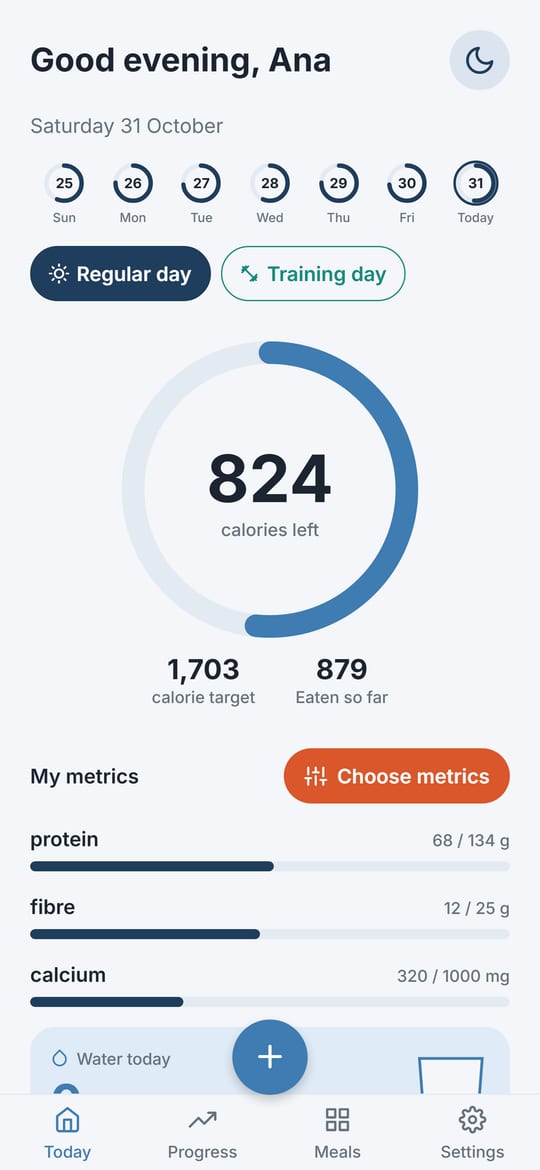
Every week Balanza compares what you logged with your smoothed weight trend, works out how much you really burn, and adjusts your calorie target, with safety rails that stop it from jumping. Alongside it, daily targets for protein, fibre and calcium. Train on some days? Set a second, training-day target and switch any day to it from the home screen. The diary and the weekly chart then measure those days against the training-day target.
A glass on the home screen fills with every drink you mark. The daily goal follows the reference of the European Food Safety Authority (EFSA), a training day adds a little, and an optional reminder nudges you through the day. In ml, or fl oz in imperial. The amount is shown exactly: 1.25 L, not rounded off.
Sugar can sit on the home screen next to your other metrics. It is shown as a ceiling, not a goal: up to 10% of your calories, as the World Health Organization advises, and the bar changes colour once you pass it.
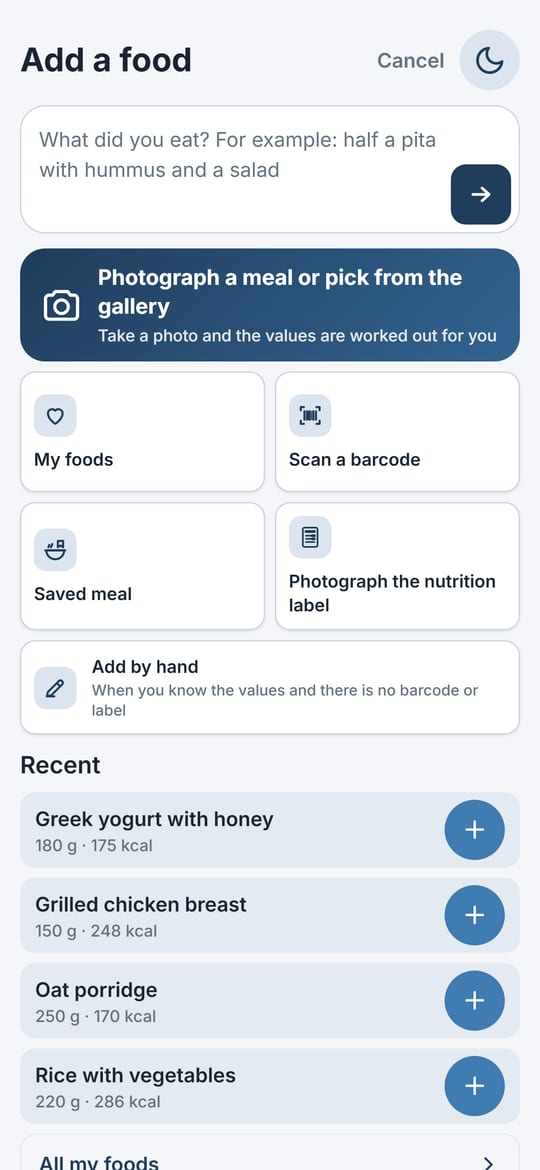
The add screen opens with the foods you usually log at this time of day, morning, midday, evening or night. One tap and it is in your diary.
At the start of every week a summary card waits on the home screen: how many days you logged, how your weight moved, your average calories and protein against the target, and how many days you were on target.
The add screen opens with a field on top: type what you ate, or tap the big photo button to photograph a meal or pick one from the gallery. My foods, barcode, saved meals, the nutrition label and manual entry are one tap away, with your recent foods underneath.
The last seven days sit at the top of the home screen, each with its own ring. Tap a day you missed to fill it in, and when yesterday is still empty, a card in the morning reminds you.
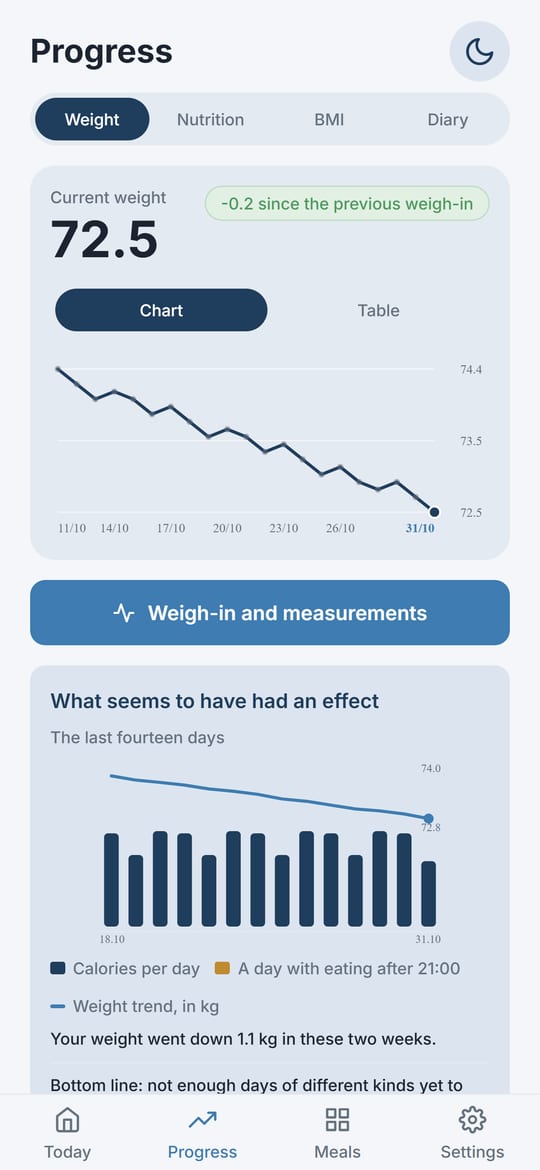
Switch the weight card from chart to table to see every weigh-in with the change since the previous one and since the start, and a summary for each month.
A weight widget puts your weight on your phone's home screen, on Android and on iPhone, and on weigh-in mornings it reminds you to step on the scale.
Choose the hour your day starts, for late nights and night shifts, so what you eat after midnight still counts toward the day you are living. And choose the first day of your week.
The first time you open Balanza, you log something you ate straight away. Then one sentence about you, with highlighted words you tap to fill in, and your daily target is ready.
Everything you have ever eaten on one screen, sorted by most eaten or most recent, back in your diary in one tap with last time's amount. Meals you repeat, you save once. Not on the list yet? Search the food database right from the same screen.
The fast is measured from the diary itself: it starts after the last food you logged and ends with the next one. Windows of 12:12, 14:10, 16:8 and 18:6, off until you switch it on.
Weight with trend, pace and an estimated arrival date; nutrition with what to cut back on and what to add; BMI, waist, chest and hips, with the waist-to-hip ratio; and a diary view of your consistency.
Every day or once a week, on the day you choose and at any time you like. Every reminder in the app can be set to any time.
A weekly overview in plain sentences: what you ate, how the weight moved, and whether late eating or particular days made a difference. Built from your own data only.
Choose what the home screen shows: protein, carbs, fat, fibre, calcium or sugar, from one to four, each with its own daily target (for sugar, an upper limit).
Breakfast, lunch, dinner and snacks, each with its own card and an add button. The meal is picked from the time of day and can be changed with a tap. Prefer one list? Switch with one tap.
English, Spanish, Portuguese, Romanian, Greek, Hungarian, Bulgarian, Slovak, Russian and Czech, switched inside the app with no restart. Food descriptions work in every one of them.
A sun or moon at the top of every screen switches between light and dark, whatever your phone is set to.
Your body today is not your body on day one. Balanza follows your weight trend (a moving average, without the daily noise of the scale), works out your real energy expenditure from your history, and sets your target to it, automatically, once a week.
If your weight is not moving, the target goes down. If it is dropping faster than it should, the target goes up. You log, it does the maths.
Real screenshots from the app. Pick one to see what it does.
The last seven days across the top, one tap to switch to a training day, the calorie ring with what is left of your target, the metrics you chose and the water glass. One button at the bottom adds food.
Type what you ate in the field on top, or tap the big button to photograph a meal or pick it from the gallery. My foods, barcode, saved meal, nutrition label and manual entry are one tap away, and your recent foods sit underneath.
Your current weight and the change since the previous weigh-in, the trend as a chart or as a table of every weigh-in, and what seems to have had an effect over the last two weeks.
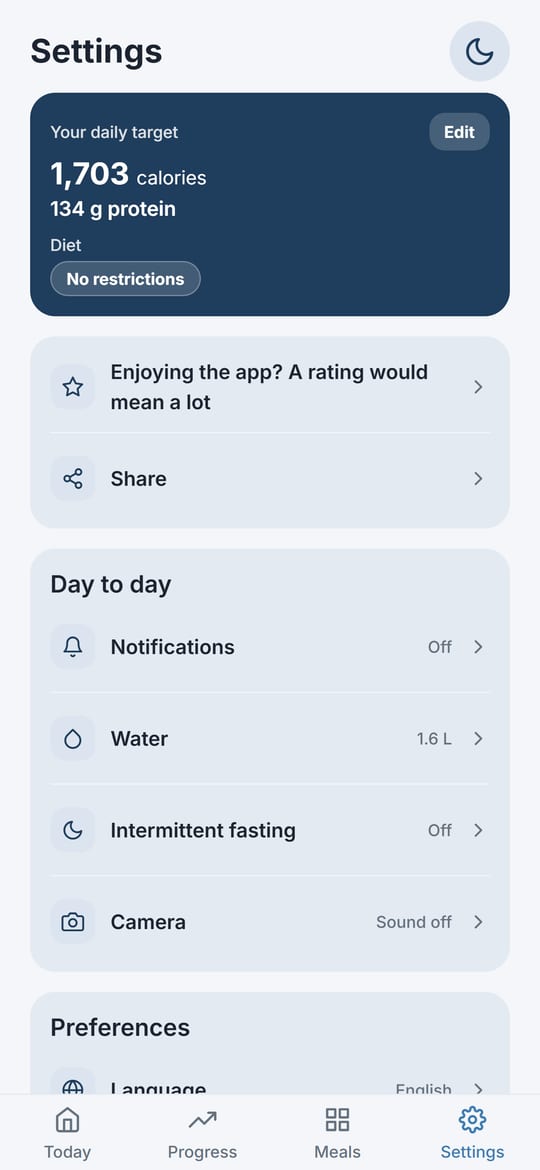
Your daily target and diet on top, then notifications, water, intermittent fasting and camera, and your preferences. Help and your account have small screens of their own.
From Google Play, with no sign-up, no email and no credit card. Just open it.
Balanza starts with your food: log something you ate, complete one sentence about yourself, and you get an instant daily target for calories, protein, fibre and calcium.
A photo, a sentence, a barcode or a tap on something you ate before. The target updates itself every week.
Not a marketing promise but the way the app is built: there is no sign-up screen at all.
The full details, no small print: Privacy policy
Calories, protein, carbs and fat of common foods, per 100 g and per typical portion.
It is really free. Every feature is open to everyone, with no subscription and no premium tier. One small ad at the bottom of some screens covers part of the running costs.
The daily target updates itself. Once a week Balanza compares what you actually ate with your weight trend, works out your real energy expenditure from it, and moves the target, instead of leaving you with the number calculated on day one. On top of that there is no sign-up at all, and the whole app works in ten languages.
Every week Balanza compares the calories you logged with your smoothed weight trend, not with a single morning on the scale, and infers how much energy you really use. If your weight is not moving the target goes down; if it drops faster than the pace you chose, it goes up. Changes are capped so the target never jumps, and there is a safe calorie floor. Adjustments start after about two weeks of logging.
Yes. Photograph the plate and the AI recognises the foods, estimates grams and works out calories, protein, carbs, fat, fibre and calcium. You confirm or correct everything before it is saved. Photos are analysed and then deleted; they are never stored.
Yes, once it knows how you eat. Choose your diet when you start or in Settings (no restrictions, Orthodox fasting, vegetarian, vegan, keto / low-carb, gluten-free or lactose-free), and photo and text recognition take it into account: for a vegan, a schnitzel is recognised as a plant-based schnitzel, with its own values, and with Orthodox fasting chosen, fasting dishes are understood as such. If the photo clearly shows something else, the app says what it sees, and everything can be corrected before it is saved.
Yes. A glass on the home screen fills as you mark each drink, with a daily goal from the European Food Safety Authority (EFSA), an optional reminder, and ml or fl oz. Sugar can be one of your home-screen metrics, shown as an upper limit: under 10% of your calories, as the World Health Organization advises.
English, Spanish, European Portuguese, Romanian, Greek, Hungarian, Bulgarian, Slovak, Russian and Czech. You switch language in the settings with no restart, and you can describe food in any of them.
Yes. The last seven days are on the home screen: tap the day you missed and add what you ate. When yesterday is still empty, a card in the morning reminds you. And if your day runs past midnight, choose the hour your day starts in Settings.
Yes. On the Progress screen, switch the weight card from chart to table: every weigh-in with the change since the previous one and since the start, and a summary for each month. There is also a weight widget for your phone's home screen, with a reminder on weigh-in mornings.
Yes. Balanza is on the App Store for iPhone and on Google Play for Android.
Yes, and it works without a timer. The fast is measured from the diary itself: it starts after the last food you logged and ends with the next one, so there is nothing to start and nothing to remember to stop. Choose a 12:12, 14:10, 16:8 or 18:6 window. The feature is off by default. Intermittent fasting is not for everyone: it is not recommended during pregnancy or breastfeeding, under 18, with diabetes or medication, or for anyone with a history of disordered eating.
No. An anonymous random id is created when you install the app, and your data is tied to it only. A recovery code brings everything back on a new phone. You can export all your data to a file or delete it for good at any time.
Correct the name on the confirmation screen and tap "update values for the new name". Calories, protein, carbs, fat, fibre and calcium are fetched for the right food, without touching the amount you already set.
Balanza was built on purpose without achievement badges, without comparisons with other people and without blaming language for a missed day. And if tracking starts to feel heavy, you can export your data and delete everything in one tap.
No. Balanza is a tool for logging food and following your weight. Every number it works out is cited to its source inside the app, with a medical disclaimer. It is not a medical device and does not replace a doctor or a dietitian, especially during pregnancy or with a chronic condition.
Balanza is completely free, with no sign-up, and available now on Google Play.